

An LFR deep dive review aimed at wide-format printing businesses
Here’s a thing that happens in print shops all over the world, every single day. A job comes in by email. Another one arrives via WhatsApp. Someone walks through the front door with a USB stick and a vague description of what they want. The files might be in Word format. Your HP Latex is sitting idle because your operator is currently hunting through three different folders and a shared spreadsheet – the one Dave built in 2018 that nobody fully understands anymore, including Dave – trying to find the right file for the job they are currently trying to print. The whiteboard has jobs on it from three Tuesdays ago that nobody has updated. Your phone buzzes: ink low. You find that out halfway through a long-run print job that is past its deadline.
When a customer calls to ask where their order is, whoever picks up has to put them on hold, track down the artwork status, find out whether the job has been briefed to production, and then call them back. Every single time. Before you even address the actual production problem, you’ve already burned ten minutes and made your customer feel like they’re chasing you. Then you go back to the floor and find out a substrate issue happened two hours ago, and nobody flagged it.
This is what a few decades of “the market will solve it” looks like when the market is a bunch of hardware fixated manufacturers who made excellent printers and then went home. The wide-format printing industry – a real industry, one that puts the signs on your local shops and the banners at your kid’s school sports day, and the vinyl wraps on the van that just overtook you on the motorway – has been running on digital duct tape since the turn of the millennium. Not because the people running these sign and print shops are bad at their jobs. It’s because nobody ever bothered to build them proper software tools.
HP’s PrintOS Production Hub is an attempt to fix that. And from everything I’ve been able to dig into, it’s a serious attempt, not a marketing deck dressed up as software.
What Actually Is It?
Let’s be precise, because the name is a bit opaque. Production Hub is not a RIP. It’s not a colour management tool. It’s a production management platform built entirely in the cloud: a piece of software that sits above your hardware and acts as the operational nervous system of your print shop, from the moment an order arrives to the moment it goes out the door.
HP calls it “the world’s only large format software that combines order management and remote production control,” which is the kind of claim that you would default to thinking should be taken with a few grains of salt. But HP commissioned competitive analysis from technology consulting firm Sogeti to back it up, and the other major large format software vendors apparently don’t offer this combination in a single platform. So maybe that claim holds true. The intent is clear, regardless: HP wants PrintOS to be the backbone of how you run your business, not just a dashboard for checking on your machine.
This matters because the previous version of PrintOS was fundamentally focused on the printer. You logged in to see what your printer was doing. Production Hub flips that: you log in to run your business, and the printers are one component of that picture. That’s a real philosophical shift, and it’s the right one.
Orders: The Problems That Make You Want to Quit
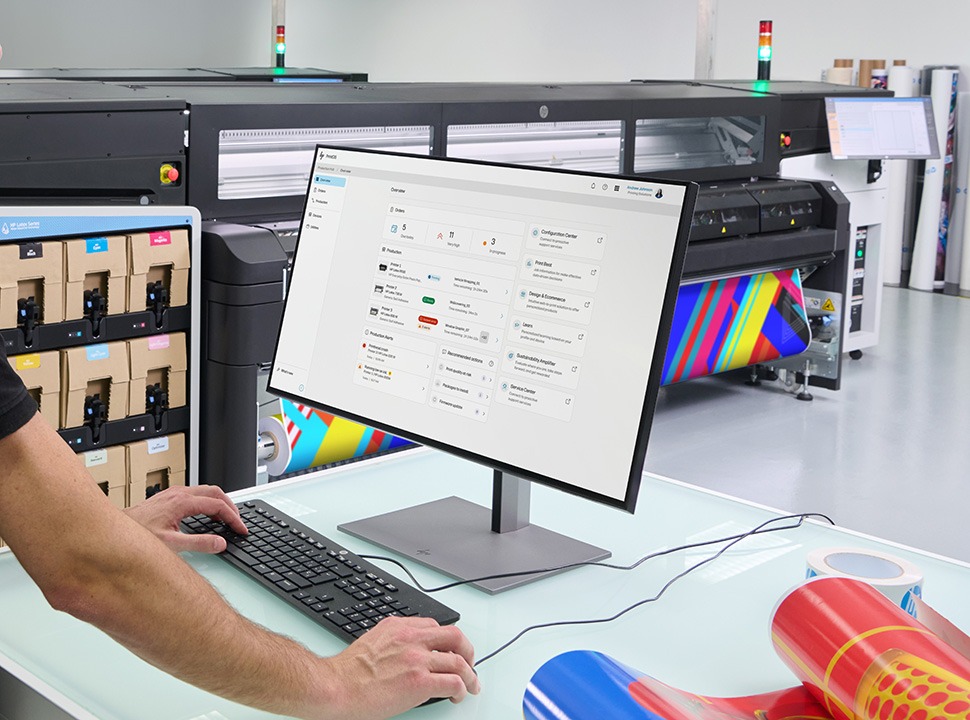
Here is what the orders module is fixing: chaos. Genuine, daily, grinding chaos that destroys margin.
The typical sign shop handles anywhere from thirty to fifty jobs a week. Those jobs arrive by email, phone, someone turning up at the counter, social media DM, or even fax if your customer is a bit of a Luddite. Each one must be logged somewhere, tracked somehow, communicated to whoever is running the machine, and checked off when it’s done. When you’re working in a print business with three or four people, the tracking system is typically a combination of a Google Sheet, a whiteboard, and somebody’s memory, problems arise. You lose jobs. You duplicate them. You print the wrong version. You invoice the wrong amount. You find out about the substrate problem after you’ve already started printing.
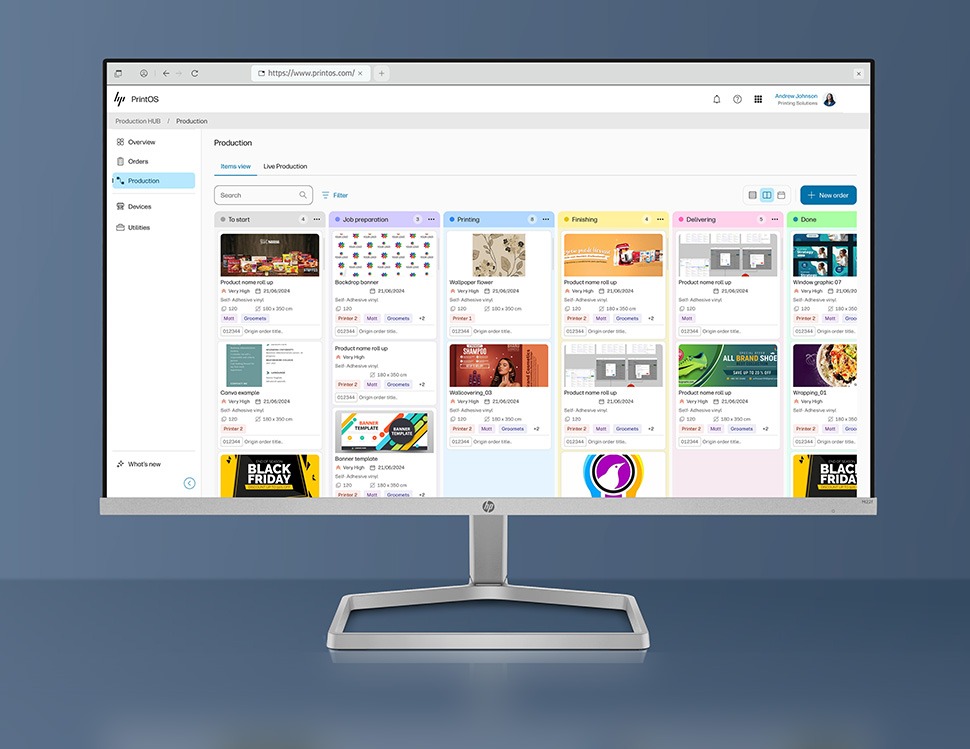
What Production Hub does is pull all of that intake into a single workflow dashboard, give every job a tracked lifecycle from creation to delivery, and expose an API that lets job data pass to external ERP or MIS systems if you’re already running something like Multipress and don’t want to type everything in twice. For a small shop, that last part is mostly academic. But the centralisation of intake alone is, for the typical shop employing three to eight people, the kind of change that alters how many hours you lose to administrative chaos every week.
The phone call problem disappears almost immediately. Before Production Hub, “where is my order” meant a hold, a hunt, a callback. After: anyone in the shop picks up, pulls up Production Hub, and answers the question while the customer is still on the line. That shift from “we’ll have to get back to you” to “I can tell you right now” turns out to matter enormously, both for customer confidence and for the internal stress load of running a small team.
The capacity planning piece is just as significant. Before live production visibility, promising a turnaround time was basically guesswork dressed up as customer service. You’d tell someone their job would be ready tomorrow without knowing whether production could absorb it, and then you’d spend the rest of the day firefighting the consequences of that promise. Now you know whether the floor is at capacity before you make the commitment. You stop overpromising. You stop apologising.
What operators consistently describe as the real unlock is the connection between the sales and order side and the physical production floor. The piece that ties a CRM or order system into actual job tracking. Before Production Hub, those two worlds ran in parallel and communicated badly. A job existed in the sales system and also, separately, as a physical job bag or a line on a whiteboard, and keeping them in sync was manual work that introduced errors constantly. The moment an order is placed, production now knows about it, owns it, and can be held accountable for it. Closing that loop is the change that operators call transformative. And they mean it.
Print Control: The One That Makes Your Eyes Light Up
This is where Production Hub genuinely earns its keep in a way that nothing else on the market currently offers.
Live Production gives you remote visibility and control over your printer queue from any device, phone, tablet or laptop. All your connected HP printers, their active jobs, on one screen. You can reorder the queue, pause a job, cancel it, resume it, from wherever you happen to be. There are proactive notifications for low ink and substrate levels, so you know there are potential issues before they become problems.
Think about what that actually means. You’re at the front counter talking to a customer who just walked in. Your HP Latex is running a job in the back. Something needs to change in the queue. Previously, you either left the customer to go and deal with it, or you didn’t and the queue ran wrong. Now you pull out your phone. Done.
You’ve left an overnight run going and you’re at home. You want to know it’s still running. You check. It is. You go to sleep.
These sound like small things, but they’re not. Machine uptime in wide format print is revenue, directly and immediately. Every hour a machine is idle costs money. Every reprinted job costs money. Every time you catch a problem before it becomes a problem, you’ve saved real money and real material. The combination of remote queue management and proactive alerts is, for an industry this dependent on physical throughput, genuinely transformative.
One caveat worth understanding before you jump in: The platform supports a wide range of HP Latex hardware, from the HP Latex 630 and HP Latex 730 series through to the HP Latex 830 series the HP Latex R series rigid printers, the industrial HP Latex FS series, and the HP Stitch textile range . But older and lower volume legacy HP Latex models may have reduced functionality compared to current generation Latex printers. Check your specific model before you build your workflow around capabilities that may not be fully available to you.
Data and Analytics: Running on Something Better Than Gut Feel
Most small sign shops have almost no visibility into their own performance. They know roughly whether last month felt busy or slow. They don’t know which job types are their most profitable, which machines are underperforming, or how their throughput has shifted from season to season.
Production Hub’s History and Analytics modules start to close that gap. They provide job history going back a year (on premium plans) which enables you to track production trends and fleet performance and provides data that lets you make decisions based on fact rather than guesswork. The Jobs API means that data can flow downstream into whatever wider business systems you’re running.
The analytics piece feeds back into the business in ways that aren’t immediately obvious. When you know exactly what every job cost from a production standpoint, you can give sales accurate feedback on margins. You stop pricing on assumption. For small and medium operations that have been running on rough guestimates for years, that data feedback loop is genuinely new territory.
This is not sophisticated business intelligence. It’s not SAP. But it is real data about your real operation, and for most of the print shops in this market, it’s a significant improvement over what they have now.
The Growth Tools
There are three key developments here, bundled under what HP calls the Grow pillar:
Learn Premium is training content covering applications, colour management, and eCommerce. It’s useful for onboarding new staff and upskilling existing operators, and less likely to be the thing that makes you sign up, but once you’re on the platform, you’ll use it.
Design and eCommerce is a web-to-print solution that connects an online designer tool directly to your production workflow, so you can build a digital storefront without bolting on a separate external platform. For print shops that want to move in that direction, this reduces the integration complexity considerably. You already have the production side running through Production Hub. The storefront feeds straight into it.
HP Sustainability Amplifier is an assessment and benchmarking tool for articulating your environmental credentials to clients. If you’re going after corporate or public sector contracts where ESG criteria show up in tenders – and increasingly they do – having this documentation in order matters much more than it used to.
Who Is This Actually For?
HP has been specific about the target market, which I appreciate because it means you can make an honest assessment of whether it fits before anyone tries to sell you something.
The primary target is the small to medium print service provider, one to ten staff, one to four machines, under fifty orders a week, currently managing workflow through whatever combination of generic tools and manual effort has accumulated over the years. For these shops, Production Hub is effectively an operational system built specifically to streamline operations. The barrier to entry is low: it runs entirely in the cloud, there’s no local installation, and all you need is a PrintOS account, a permanent internet connection on the printer, and a device to access the platform.
The secondary target is the larger, more digitally mature operation, ten or more staff, multiple machines, maybe across multiple sites, which has some software ecosystem already in place but finds it fragmented and hard to connect. For them, the value is in consolidation and the API connectivity that lets Production Hub talk to existing systems rather than replace them.
What it’s not trying to be is a replacement for a full enterprise MIS at the high end of the market. That’s fine. There’s a vast middle of this industry that has been chronically underserved by software built specifically for it, and that’s where this is aimed.
The Subscription Structure
This is worth understanding clearly, because the pricing model is where things get more complex and where some people will baulk.
Premium Production Hub features are not standalone software. They’re bundled into HP’s Professional Print Service Plans, the PPSP. The two main tiers for wide format shops are Software Suite, which gets you the full Orders management, Live Production, Analytics, Configuration Center, Design and eCommerce, Sustainability Amplifier, and Training Suite; and Plus, which adds a full hardware support layer, remote support access, service parts and maintenance kits, on site labour, and proactive support through HP Service Center. There’s also a Channel Plus variant sold through HP’s reseller partners.
Minimum commitment is one year, and pricing varies by printer model and territory. You’ll need to talk to an HP rep or partner for specifics.
The warranty window matters here. If you’re still within your printer’s warranty period, you get access to the full premium solution set during that window as part of the plan. Once you’re out of warranty, without a PPSP subscription, you drop back to the Lite tier: basic device monitoring, some analytics, Configuration Center, and the free training content. The workflow management and live production control that define Production Hub’s value proposition are gone without the subscription. That’s the deal, and it’s worth understanding before you commit.
A trial lasting three months is available for eligible customers and printers. Use it. Three months is enough time to understand whether the order management workflow fits how your business operates, and whether Live Production earns its place in your daily routine.
The Honest Take
The wide format printing industry has been running on workarounds for a generation. Not because the people in it aren’t smart – they absolutely are and many of them have built genuinely impressive improvised systems – but because nobody built them what they actually needed. The tools that existed were either focused entirely on monitoring the printer, or generic business software that didn’t understand the specific rhythms and constraints of a physical production shop.
The net result, for too many print shops, has been a business that runs on firefighting. Reactive rather than planned. Always catching up rather than looking ahead. The kind of operation where the owner is the single point of failure for every decision, every status query, every capacity judgement, because the systems don’t hold enough information for anyone else to act.
Production Hub is the most coherent answer to that gap that HP has produced. The remote production control is genuinely differentiated. No competitor currently offers that in combination with centralised order management in a single platform, at least as of now. The orders workflow addresses the daily operational chaos that bleeds time and money from small print shops constantly. The analytics give you a foundation for decisions grounded in evidence rather than intuition. And the businesses that have made the transition consistently report the same thing: less firefighting, more forward planning, a business that finally feels manageable rather than relentless.
The subscription model is a philosophical shift, and some people will resist it, reasonably. You’re not buying software outright. You’re subscribing to a platform that will keep evolving. The upside is continuous updates and new features without additional cost. The downside is an ongoing commitment, and the value calculation changes if your hardware ages out of premium compatibility.
But if you’re running a five-person wide format print shop with several dozen jobs a week to deliver and your current system is a whiteboard and good intentions, this platform could genuinely transform how you work. Not in the way marketing copy promises things. In a “anyone on my team can now answer the phone and actually help the customer” way. In a “we stopped promising delivery dates we couldn’t keep” way. In a “I can manage my production floor from my phone while I’m serving someone at the front counter” way.
The trial period is there for a reason. Take it.
Compatible printer models and regional availability vary. Premium features require an HP Professional Print Service Plus or Software Suite plan. Trial availability subject to eligibility.